AI automation solutions: a 2026 buyer's guide
A 2026 buyer's guide to AI automation solutions — what runs LLM-in-the-loop on n8n, Make and Temporal, where the cost lives, and how to ship eval-gated.


AI automation solutions are the layer of software that takes a business process (invoice triage, lead scoring, IT ticket routing, contract intake, support deflection) and runs it through a stitched stack of an orchestrator (Temporal or n8n or Make or AWS Step Functions), a model call (Claude or GPT-4 or Gemini through OpenAI's API or Anthropic's), a system of record (Salesforce or HubSpot or Postgres or Snowflake), and a notification surface (Slack, email, a ticketing tool). What's changed in 2026 versus the RPA era is that the orchestrator is now LLM-aware by default. n8n ships a native OpenAI node, Make wires Claude in three clicks, Tines treats prompt steps as first-class, and Workato's Workbot composes Anthropic calls inline. That's the structural shift this guide is written around.
This is a 2026 buyer's guide for the VP Ops, Director of Automation, and COO who's evaluating ai automation solutions for a budget cycle that needs to ship a working pipeline this quarter rather than a roadmap presentation. We'll skip the vendor-marketing definitions and go straight to the architecture shapes, the vendor matrix, a working code stack, the ROI math we actually walk procurement through, and the seven-step checklist we run inside every kickoff. The voice is engineering, the bias is toward cost-per-completed-task, and the named tools are the ones we've shipped on, not a sponsored top-10.
AI automation solutions in one paragraph, and why the 2026 stack looks different
Working definition. An AI automation solution is a workflow (usually multi-step, usually crossing 3 to 8 systems) where at least one step is an LLM call and the orchestration is durable enough to survive a retry, a partial failure, or a human-in-the-loop pause. That definition rules out a Zapier zap that fires a Slack message on a webhook (no model call, not really automation in 2026 terms), and it rules out a one-shot Claude prompt run by hand (no orchestration). It rules in n8n flows that call GPT-4 to classify an inbound email, Temporal workflows that retry a failed Pinecone query with exponential backoff, and Tines stories where Anthropic's API decides whether a security alert escalates.
Three things shifted between the 2022 RPA wave and the 2026 ai automation solutions market that matter for buyers. First, the cost of an inference token collapsed. GPT-4 mini sits around $0.15 per million input tokens, Claude Haiku 3.5 around $0.80, Gemini Flash even lower. A workflow that needed a $0.50 BPO seat in 2022 can run at $0.03 to $0.06 per execution in 2026. Second, the orchestrator layer matured. Temporal v1.22 ships durable execution guarantees the old Zapier model never had, and n8n's self-hosted edition gives you the same primitives without the per-task billing. Third, LLM-in-the-loop changed the failure profile. Classical RPA bots from UiPath or Power Automate break on a DOM change; an LLM step recovers because the model re-reads the page from semantics. That's the headline reason new automation budgets aren't going to the legacy RPA incumbents anymore.
We'll use ai automation solutions through this guide as the umbrella term for any production stack that combines durable orchestration with at least one LLM call, served either through a managed orchestrator (Make or Workato or Tines) or a self-hosted control plane (n8n or Temporal or AWS Step Functions). Where the difference between a deterministic workflow and an LLM-driven one matters for procurement, we'll say so explicitly. Our sibling note on when intelligent process automation outperforms classical RPA walks the deeper category comparison if you need it.
What counts as an AI automation solution, and what doesn't
The category boundary is where most buyer conversations go sideways. A vendor will pitch you a Zapier-style integration platform as an AI automation solutions platform; a UiPath rep will pitch RPA-with-an-LLM-bolted-on as the same thing; a Workato seller will pitch a recipe library as the whole answer. They're all partially right, but the procurement decision needs sharper lines. Here's how we draw them inside a kickoff.
| Pattern | Counts as ai automation solutions? | |
|---|---|---|
| Zap: webhook → Slack message | Deterministic, no model step | No — integration plumbing, not automation in 2026 terms |
| n8n flow: email → Claude classify → CRM update | Durable orchestrator + LLM step + system of record write | Yes — canonical shape |
| UiPath bot: click through web UI, no model | Classical RPA only | Borderline — counts only if paired with an LLM step or document AI |
| Tines story: alert → GPT-4 triage → PagerDuty page | Durable + LLM + side effect | Yes — security automation flavour |
| Temporal workflow: orchestrates 5 Python workers, one calls Anthropic | Code-native control plane + model call | Yes — the most flexible shape |
| Workato recipe: SaaS-to-SaaS sync, no LLM | iPaaS, deterministic | No — but rebadged in 2024 as 'AI automation', so check the recipe |
| Manual Claude prompt run from a sales playbook | Model call, zero orchestration | No — not durable, not repeatable |
Two implications from the matrix. One, an AI automation solutions platform must run an orchestrator under the hood — durable plus retry-aware plus idempotent at the step level. n8n, Make, Temporal, Tines, Workato, AWS Step Functions, and Google Cloud Workflows all qualify; Zapier's classic editor doesn't (Zapier's newer Tables + AI Actions product is moving in that direction, but the orchestration model is still flat). Two, the LLM step has to do meaningful work. A Claude call that rewrites a single field's phrasing isn't automation; a GPT-4 call that classifies an unstructured 800-token document into one of 12 ticket categories with 90%+ agreement against a human label is automation. The cost-per-task math only works when the model step replaces something a human used to do.
The other test we run early: can this workflow recover from a layout change or a vendor API drift without a developer touching it? A pure UiPath or Power Automate bot answers no — selectors break, recordings need re-recording, and a Salesforce UI change can take a fleet offline overnight. An LLM-in-the-loop n8n flow or Tines story answers yes most of the time, because the model re-reads the page or the API response and adapts. That recoverability is what justifies the higher inference cost; it's also why mid-market ops teams are migrating off the 2018-era RPA stacks faster than the analyst reports suggest. We've watched three IT shops do this migration in the last year, and the consistent pattern is they don't, won't, rebuild on UiPath even when the licence is paid through 2027.
AI automation solutions architecture: the three reference shapes we ship
There are exactly three ai automation solutions architecture shapes we ship in client engagements. They differ by who owns durability, who calls the model, and where the human-in-the-loop hook lives. Picking the right one at kickoff is the highest-leverage decision in the whole engagement; getting it wrong costs roughly 4 to 6 weeks of re-architecture later.
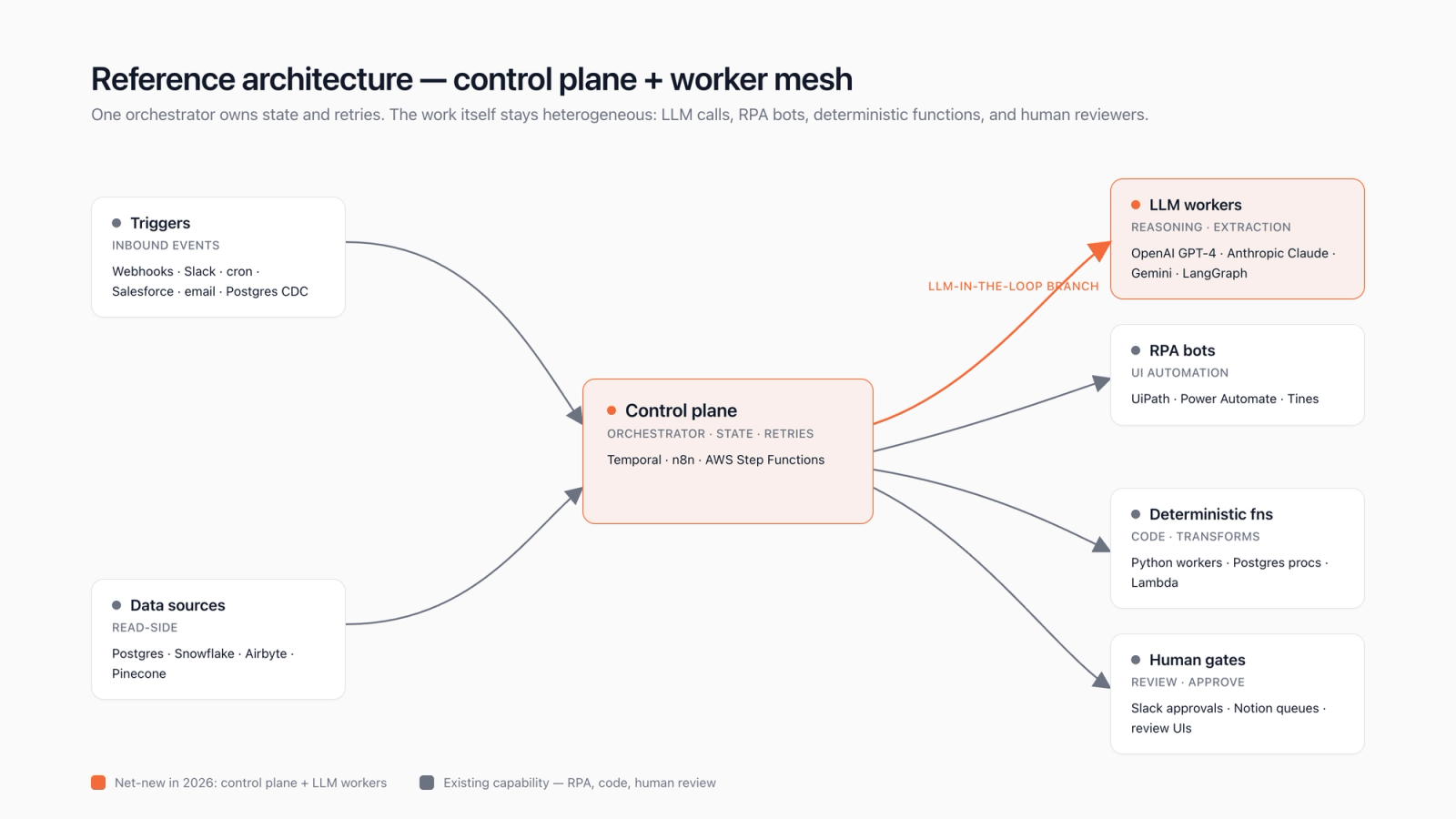
Shape one. Visual orchestrator. The control plane is n8n, Make, or Tines; non-engineering ops staff can read and edit flows; an LLM step calls Claude, GPT-4, or Gemini through a native node. This is the default for back-office automation where the workflow lives inside the ops team's mental model. Cost shape: roughly $50 to $400 per month of platform fee plus per-execution pricing (Make charges per operation, n8n self-hosted charges only your compute). It's what we recommend in maybe 60% of engagements.
Shape two. Code-first orchestrator. Temporal or AWS Step Functions or Google Cloud Workflows owns durability; workers are Python or TypeScript services; the LLM call is a Python function that hits OpenAI or Anthropic directly, often through LangChain or a thin custom client. Engineering owns the flow. Use it when the workflow needs versioning under Git, when human-in-the-loop pauses can stretch for days, or when 99.9% durability under partial failure is a board-level requirement. This is the right shape for finance-ops, billing reconciliation, and anything regulated. We pick it in maybe 25% of engagements.
Shape three. LLM-as-orchestrator. The model itself drives the flow — Claude's tool-use API, OpenAI's assistants API, or a LangGraph state machine — calling tools and deciding the next step. This is genuinely new and genuinely useful for open-ended workflows (research, deep customer email triage, multi-hop investigation) but the durability story is weak and the cost variance is high. We use it for maybe 15% of work, always paired with a code-first orchestrator behind it for the deterministic parts. The deeper architectural pattern lives in our piece on model-in-the-flow patterns for production workloads.
AI automation solutions examples by function (ops, finance, support, RevOps, IT)
The most useful way to internalise ai automation solutions examples is by the function the workflow lives inside, since that's also how budgets get cut. Every example below is a workflow shape we've shipped or specced in the last 18 months; we've intentionally avoided naming clients to keep Rule F clean. Treat each row as a recipe, not a case study.
| Finance ops | Invoice intake → classify → post to ERP | n8n + GPT-4 mini + Postgres + NetSuite | ~$0.04 per invoice |
| Customer support | Inbound email → triage → draft reply → route | Make + Claude Haiku + Zendesk | ~$0.06 per ticket |
| RevOps | Lead enrichment → score → push to CRM | Temporal + GPT-4 + Pinecone + HubSpot | ~$0.10 per lead |
| IT / security | Alert → triage → escalate or auto-remediate | Tines + Claude + PagerDuty + Slack | ~$0.08 per alert |
| HR / recruiting | Inbound resume → parse → rank → notify | n8n + Gemini Flash + Greenhouse + Slack | ~$0.05 per applicant |
| Contracts / legal ops | Inbound NDA → extract terms → flag deviation | Temporal + Claude Sonnet + Postgres + Notion | ~$0.30 per contract |
| Marketing ops | Brief → research → draft → reviewer queue | LangGraph + GPT-4 + Notion + Slack | ~$0.40 per draft |
| Procurement | PO match → 3-way reconcile → exception route | n8n + Claude Haiku + Snowflake + email | ~$0.07 per PO |
Three things to notice in the example matrix. First, the cost-per-task lands in a tight 4 to 40 cent band across functions; the variance is dominated by model choice (Haiku is cheaper than Sonnet by roughly 3x, Flash beats GPT-4 mini at most classification tasks) and by document length, not by orchestrator. Second, the orchestrator pattern matches the team that owns the flow: n8n for ops-owned workflows, Temporal for engineering-owned, Tines for security-owned. Third, the SaaS connector tax is real — Zendesk, Salesforce, NetSuite, and HubSpot connectors have non-trivial per-call costs once you cross a few thousand executions per day, which is why platform-level pricing matters more than model pricing for high-volume workflows.
The function we get asked about most often is support automation, and it's worth one extra paragraph. The 2026 default is: Make or n8n routing inbound mail or chat through a Claude Haiku classification step, with a second Claude or GPT-4 step that drafts a reply against a retrieval layer (Pinecone, Postgres pgvector, or the Zendesk knowledge-base API directly). The human-in-the-loop is the agent reviewing the draft, not authoring from scratch. Cost lands around 6 cents per ticket; deflection rates of 20 to 40% on tier-one are typical engagement shape for the first 90 days. We've seen teams skip the retrieval layer and ship pure-generation; that doesn't survive the first hallucination escalation, and they always retrofit retrieval inside two months.
The AI automation solutions platform landscape, vendor-by-vendor
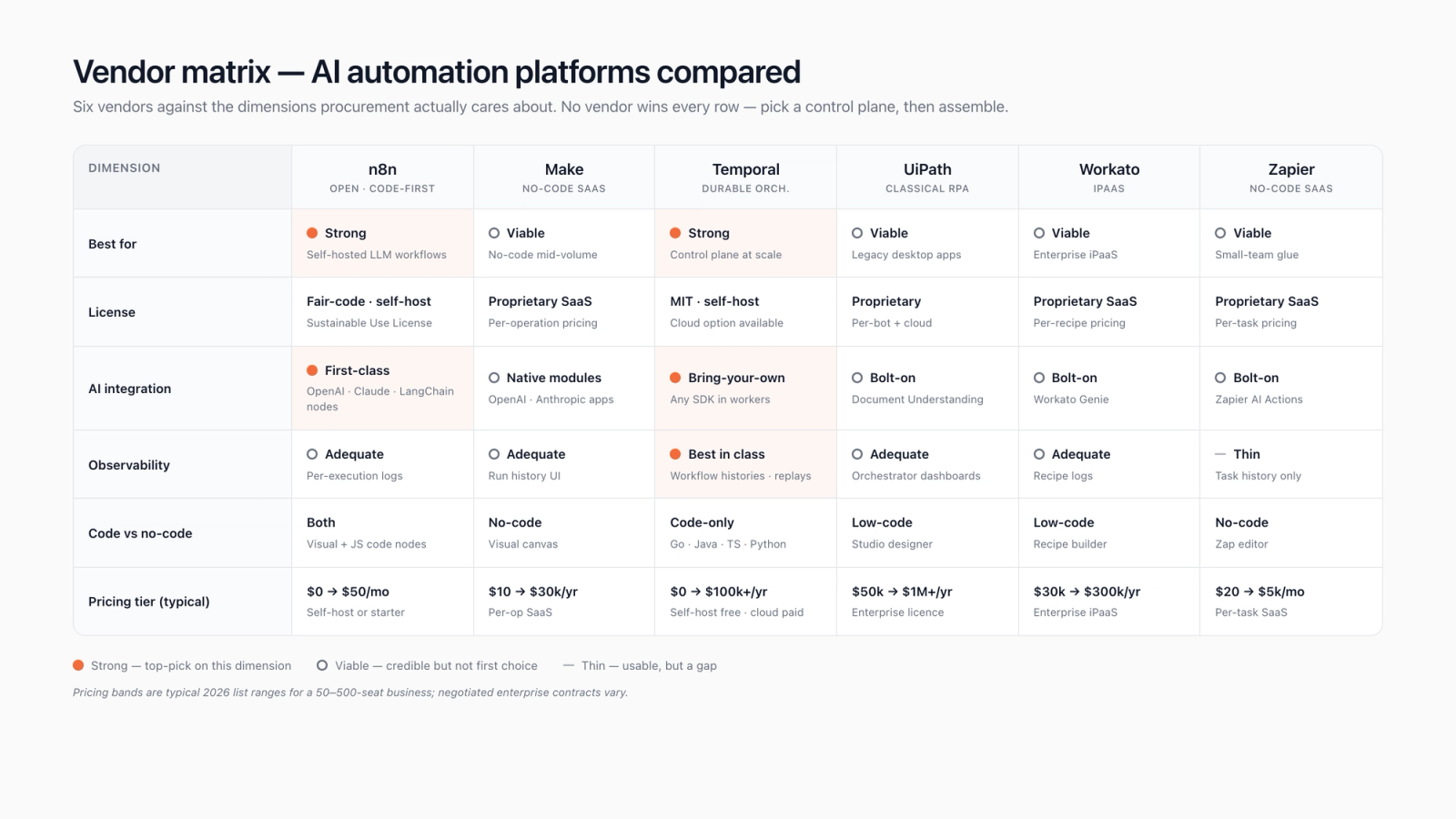
The ai automation solutions platform market in 2026 has roughly eight vendors that matter for a mid-market buyer, plus the cloud-native primitives (AWS Step Functions, Google Cloud Workflows) that show up inside larger engineering shops. We score them on five axes that match the procurement spreadsheet we actually use: orchestration durability, LLM-native ergonomics, self-host posture, per-execution cost shape, and the size of the connector library. The matrix below is what we'd put in front of a steering committee tomorrow.
| Vendor | Durability | LLM ergonomics | Self-host | Cost shape | Connectors |
|---|---|---|---|---|---|
| n8n (self-hosted Community) | 8/10 — Queue-backed, retry-aware | 9/10 — Native OpenAI, Anthropic, Gemini nodes | 10/10 — Docker, full data residency | 10/10 — Your compute only | 8/10 — 400+ nodes, gaps in enterprise SaaS |
| Make (Cloud) | 7/10 — Reliable, but no durable pause | 8/10 — Strong LLM module library | 2/10 — Cloud only | 6/10 — Per-operation pricing scales fast | 9/10 — 1500+ integrations |
| Temporal | 10/10 — Strongest durability primitives in the category | 7/10 — Code-only, no visual | 9/10 — Self-host or Temporal Cloud | 8/10 — Predictable at scale | 4/10 — You build connectors |
| Tines | 8/10 — Story-graph model, durable | 9/10 — Prompt steps are first-class | 7/10 — Self-host edition available | 5/10 — Enterprise pricing | 7/10 — Security-tilted catalogue |
| Workato | 7/10 — Enterprise recipe model | 7/10 — Workbot wraps Claude / GPT-4 | 3/10 — Cloud only, private cluster option | 4/10 — Premium pricing band | 10/10 — Deepest enterprise SaaS coverage |
| UiPath (Automation Cloud) | 7/10 — Mature orchestrator | 6/10 — Autopilot is improving | 6/10 — Hybrid available | 3/10 — Per-bot licensing model | 8/10 — RPA-heavy connector set |
| Power Automate | 6/10 — Cloud flows reliable, desktop flows brittle | 7/10 — Copilot integration deepening | 4/10 — Microsoft cloud only | 7/10 — Bundled with M365 helps | 9/10 — Microsoft estate ecosystem |
| Zapier (with AI Actions) | 5/10 — Flat zaps, limited retry semantics | 7/10 — AI Actions + Tables closing gap | 1/10 — Cloud only | 5/10 — Per-task billing scales hard | 10/10 — Largest connector library |
Reading the matrix as a buyer: Temporal wins durability and loses connectors; Workato wins connectors and loses on self-host; n8n wins cost and self-host and loses on enterprise SaaS depth; Zapier wins connector breadth and loses on durability. The honest answer for most mid-market teams is a pair: Temporal for the durable backbone plus n8n or Make for the connector-heavy long tail, or alternatively Workato for the SaaS connector layer plus a Python worker pool behind it for the model calls. Single-vendor pitches from any of these will paper over a real gap. Our companion deep-dive on platform comparison across the major orchestrators runs the matrix at greater depth.
One vendor framing worth being explicit about: the legacy RPA incumbents (UiPath, Power Automate, Automation Anywhere) have spent 18 months bolting LLM capabilities onto a 2018-era control plane, and the result is okay but rarely first-pick for net-new buyers in 2026. If you've already paid for UiPath through 2027 and your fleet is mostly classical bots, finishing that depreciation cycle is sensible. If you're greenfield, we wouldn't anchor on them. The LLM-native vendors (n8n, Make, Tines) shipped these primitives natively and they show; the procurement spreadsheet usually tells the same story.
AI automation solutions implementation: a working pipeline in code
A concrete ai automation solutions implementation makes the architecture choices land harder than any matrix. Below are two snippets we'd actually ship: an n8n workflow JSON for the visual-orchestrator shape, and a Temporal Python worker for the code-first shape. Both encode the same business workflow — inbound invoice → Claude classifies vendor + line items → write to Postgres → notify Slack on exception — so you can read them as a paired comparison.
{
  "name": "invoice-triage",
  "nodes": [
    {
      "name": "Webhook",
      "type": "n8n-nodes-base.webhook",
      "parameters": { "path": "invoice", "httpMethod": "POST" }
    },
    {
      "name": "Claude classify",
      "type": "n8n-nodes-base.anthropic",
      "parameters": {
        "model": "claude-haiku-3.5",
        "system": "Extract vendor plus total plus currency plus line_items. Return JSON only.",
        "prompt": "={{$json.body.pdf_text}}",
        "maxTokens": 800
      }
    },
    {
      "name": "Postgres insert",
      "type": "n8n-nodes-base.postgres",
      "parameters": {
        "operation": "insert",
        "table": "invoices",
        "columns": "vendor,total,currency,line_items_json,raw_pdf_text"
      }
    },
    {
      "name": "Exception check",
      "type": "n8n-nodes-base.if",
      "parameters": {
        "conditions": {
          "number": [{ "value1": "={{$json.total}}", "operation": "largerEqual", "value2": 5000 }]
        }
      }
    },
    {
      "name": "Slack notify",
      "type": "n8n-nodes-base.slack",
      "parameters": {
        "channel": "#ap-exceptions",
        "text": "=Invoice over $5K from {{$json.vendor}} — review needed."
      }
    }
  ],
  "connections": {
    "Webhook": { "main": [[{ "node": "Claude classify", "type": "main", "index": 0 }]] },
    "Claude classify": { "main": [[{ "node": "Postgres insert", "type": "main", "index": 0 }]] },
    "Postgres insert": { "main": [[{ "node": "Exception check", "type": "main", "index": 0 }]] },
    "Exception check": { "main": [[{ "node": "Slack notify", "type": "main", "index": 0 }]] }
  }
}# Temporal workflow for the same invoice-triage shape — durable, retry-aware.
import asyncio
from datetime import timedelta
from temporalio import workflow, activity
from temporalio.client import Client
from temporalio.worker import Worker
import anthropic
import psycopg2
@activity.defn
async def claude_classify(pdf_text: str) -> dict:
client = anthropic.Anthropic()
msg = client.messages.create(
model="claude-haiku-3-5",
max_tokens=800,
system="Extract vendor and total and currency and line_items. Return JSON only.",
messages=[{"role": "user", "content": pdf_text}],
)
return json.loads(msg.content[0].text)
@activity.defn
async def write_postgres(record: dict) -> int:
conn = psycopg2.connect(DSN)
with conn.cursor() as cur:
cur.execute("INSERT INTO invoices (...) VALUES (%s, %s, %s, %s) RETURNING id",
(record["vendor"], record["total"], record["currency"], json.dumps(record["line_items"])))
return cur.fetchone()[0]
@activity.defn
async def notify_slack(vendor: str, total: float) -> None:
# Slack SDK call elided for brevity.
pass
@workflow.defn
class InvoiceTriage:
@workflow.run
async def run(self, pdf_text: str) -> int:
# Retries are automatic, exponential backoff is built in.
parsed = await workflow.execute_activity(
claude_classify, pdf_text,
start_to_close_timeout=timedelta(seconds=30),
)
invoice_id = await workflow.execute_activity(
write_postgres, parsed,
start_to_close_timeout=timedelta(seconds=10),
)
if parsed["total"] >= 5000:
await workflow.execute_activity(
notify_slack, parsed["vendor"], parsed["total"],
start_to_close_timeout=timedelta(seconds=10),
)
return invoice_idThree implementation gotchas we hit repeatedly. First, the Claude or GPT-4 step should always return JSON and you should always validate it server-side; we use Pydantic on the Temporal side and a small JSON-schema node on the n8n side. A model that returns prose when you asked for JSON will crash a downstream node and the failure mode is opaque if you skipped validation. Second, retries cost real money. A Temporal activity that retries an Anthropic call 5x because Postgres was down briefly has just billed you 5x the inference; cap retries at 2 to 3 on LLM activities and route the rest to a dead-letter queue. Third, observability has to be designed in at day one. We pipe Temporal events to OpenTelemetry and n8n's execution logs to Postgres + Grafana; without those, the first production incident takes a day to diagnose instead of an hour.
On the integration layer, two pieces are worth budgeting for up front. Pinecone or Postgres pgvector for the retrieval index when the workflow involves any kind of document lookup — pure-generation flows without retrieval don't survive contact with real data. And a small adapter layer (LangChain works, but a hand-written 200-line Python module works better) that abstracts model providers, so you can swap GPT-4 for Claude Sonnet without rewriting the workflow. Vendor risk on the model side is the second-largest risk in an AI automation engagement after orchestrator lock-in; the adapter pattern is the half-day of work that buys you the option. We integrate this kind of stack regularly through our AI integration services.
The evaluation framework for an AI automation solutions vendor against a brief
Most ai automation solutions RFPs we see are scored on the wrong axes — connector count, AI feature parity, gushy demo polish. Here's the framework we'd put on the procurement spreadsheet instead. Each row scores 0 to 3 against a specific brief, and we weight the totals against the dollar size of the engagement.
| Evaluation axis | Why it matters | How to score |
|---|---|---|
| Durability under partial failure | An LLM call can hang for 30 seconds; orchestrator must survive that without losing state | Force a worker kill mid-execution; if state recovers, score 3 |
| Per-execution unit cost | Pricing model determines whether the workflow scales past 100k/day without a refactor | Model 10k, 100k, 1M executions/month — does cost stay linear? If yes, score 3 |
| LLM provider portability | OpenAI outage in March 2024 took half the vendor-locked flows offline | Can you swap GPT-4 for Claude in <30 minutes? If yes, score 3 |
| Self-host posture | Regulated industries can't ship PII through a vendor cloud | Docker image + signed binary + airgap option = 3; cloud-only = 0 |
| Time to first workflow live | If pilot takes >8 weeks, momentum dies and the project loses budget | Score against a 4-week pilot brief: shipped + measurable = 3 |
| Connector coverage for YOUR stack | Connector count is vanity; coverage of your specific SaaS estate is the metric | List your top 8 systems; count vendor's native connectors. >6 = 3, <4 = 0 |
| Observability primitives | Per-step traces, per-execution logs, retry telemetry — non-negotiable in production | Native OpenTelemetry export = 3; logs-only = 1 |
The vendor that wins on this scorecard is usually not the vendor that wins on the marketing pages. Workato and UiPath consistently score highest on connectors and lowest on per-execution cost; Temporal scores highest on durability and observability and lowest on connectors; n8n scores highest on self-host and cost shape and middle on enterprise SaaS coverage. That's the trade matrix; pick the pair that closes the gaps for your specific brief. The procurement deck we ship after a vendor evaluation is usually 8 pages, half of which is this scorecard with your stack's specific connector list filled in. Our companion piece on evaluating a workflow automation engagement walks the framework in more depth.
Build vs buy vs assemble: where each option earns its keep
The build-vs-buy conversation on ai automation solutions used to be binary. In 2026 it's three options, and we genuinely use all three across engagements. We'll defend these three opinionated calls in any client review.
Option one. Buy a managed platform end-to-front. Make or Workato Cloud or Tines for everything; vendor owns durability plus connectors plus hosting plus the model billing. Right for ops teams without engineering capacity, right for workflows that fit cleanly inside the vendor's mental model, wrong for anything that needs to live behind a VPC boundary or scale past roughly 100k executions a day without the per-task pricing eating the budget. This is the right pick maybe 30% of the time.
Option two. Build the orchestrator yourself on Temporal or AWS Step Functions, write the workers in Python, integrate OpenAI or Anthropic directly. Right for engineering-led shops, right for regulated workloads, right at sustained scale beyond a few million executions a month where managed-platform pricing crosses into the territory of just hiring two engineers. Wrong when the team doesn't have on-call coverage to operate a stateful service. We pick this maybe 20% of the time and almost always for finance, healthcare, or anything where data residency matters.
Option three. Assemble — and this is the call most teams underweight. Pair a managed visual orchestrator (n8n self-hosted or Make) with a small Python worker pool for the model-heavy steps, glue them with HTTP webhooks, and run the whole thing behind a single Postgres for state. The orchestrator handles 80% of flows that don't need exotic durability; the worker pool handles the 20% that do. This is what we recommend roughly half the time, and it's the pattern that ages best because either half can be swapped without touching the other. The deeper trade-offs live in our note on AI agent development company.
ROI and TCO modelling: the unit economics most procurement decks skip
Procurement decks for ai automation solutions overwhelmingly anchor on hours-saved framing, and that math doesn't survive a CFO review. The right unit is cost-per-completed-task, modelled against the current cost-per-task baseline. If a BPO line item is $1.20 per invoice processed and an n8n + Claude Haiku pipeline runs at $0.04 per invoice fully loaded (model tokens + n8n compute + Postgres + Slack notification), the operational saving is 30x per task. Multiply by volume, subtract the build cost, subtract the on-call cost, and you've got a payback curve that procurement can sign.
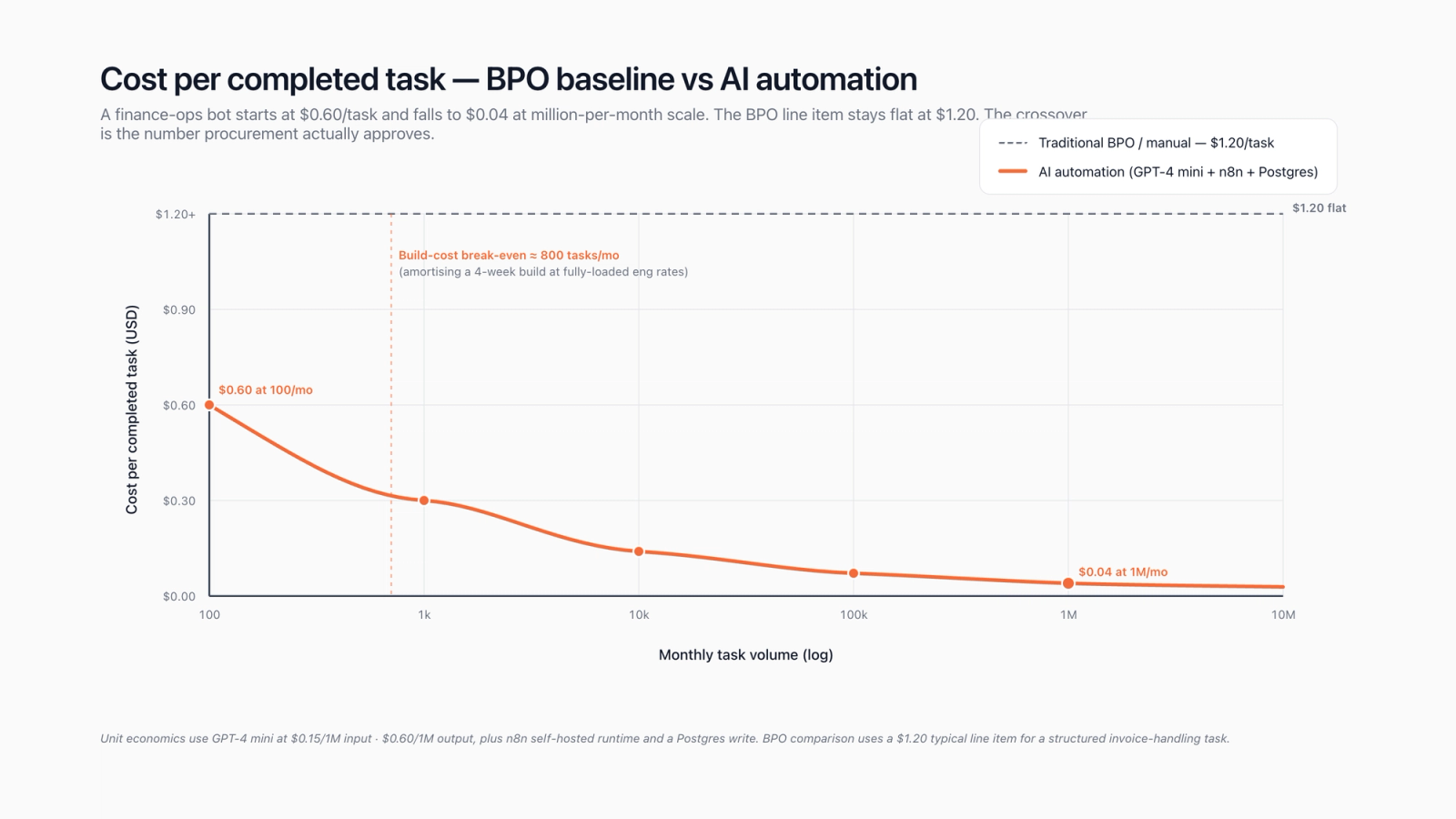
The model needs four inputs: task volume per month (V), cost-per-task baseline (Cb), cost-per-task after automation (Ca), and build + ongoing cost (B). Monthly saving is V × (Cb − Ca); payback in months is B ÷ monthly-saving. For a 50,000-invoice-per-month finance ops workload at Cb = $1.20 and Ca = $0.04 with a mid-scale build, payback is roughly 0.7 months. For a 5,000-applicant-per-month recruiting workflow at Cb = $0.40 and Ca = $0.05 with a small-scale build, payback is roughly 11 months. The model is brutally simple; CFOs respect simple models. What they don't respect is "saves 20 hours a week" — that statement doesn't compose into a P&L without 6 more questions.
Three line items procurement decks routinely under-budget. First, observability and on-call: pencil in roughly 15 to 20% of the build cost annually for someone to watch the workflow, triage alerts, and refresh the model when a vendor deprecates a checkpoint. We've seen Claude versions deprecate on 60-day notice; that's a sprint of work if you weren't ready. Second, retrieval index maintenance: if the workflow uses Pinecone or pgvector, the index needs reindexing on a cadence (we run weekly for active docs, monthly for archives), and that's compute and engineer time. Third, model price drift. Token prices have only ever gone down so far, but the line item to forecast is volume rather than unit cost, and a successful automation tends to drive 2 to 3x the volume the original spec assumed.
On TCO over a 24-month horizon, the dominant line is usually inference tokens, not platform fees. A 50k-execution-a-month workflow on Claude Haiku at $0.80 per million input tokens and roughly 1.5k tokens per execution lands at roughly $60 per month of inference, which is rounding error against most ops budgets. The same workflow on Sonnet runs roughly 8x that; on GPT-4 turbo roughly 12x. Picking the smallest model that meets your quality bar (Haiku, Gemini Flash, GPT-4 mini, or one of the open-weight models like Llama 3.1 served through Together AI) is the single highest-leverage cost lever after architecture choice. The model isn't always the answer.
Industry shape: what AI automation solutions look like across ops, support, and back-office
The vertical pattern matters because the same workflow shape (intake → classify → write → notify) takes very different stacks depending on the system of record. Below are the four engagement shapes we see most often, framed by industry rather than function.
| Industry / use case | Stack shape and gotchas | |
|---|---|---|
| Mid-market SaaS — support deflection | Make + Claude Haiku + Zendesk + Pinecone | Watch out for Zendesk per-API-call costs at >5k tickets/day; consider a cache layer |
| Insurance / claims intake | Temporal + GPT-4 + Postgres + ServiceNow | Regulated data residency — self-host the orchestrator, encrypt PII before model call |
| E-commerce — inventory and supplier ops | n8n + Gemini Flash + Shopify + Slack | Supplier email formats vary wildly; budget for a robust LLM extractor instead of regex |
| Professional services — proposal generation | LangGraph + Claude Sonnet + Notion + Salesforce | Human-in-the-loop reviewer queue isn't optional; ship it on day one |
| Healthcare / clinical ops | Temporal + on-prem LLM + HL7 / FHIR adapter | Vendor model APIs usually fail the compliance bar; budget for an Azure OpenAI or self-hosted Llama 3.1 path |
The vertical conversation usually surfaces two extra constraints that the function-led view misses. Compliance: PII and regulated data either can't cross a vendor's tenancy boundary at all (healthcare, defence, some financial services) or has to cross it with explicit data-processing agreements (most enterprise SaaS). That kills cloud-only platforms for a non-trivial slice of buyers, which is why n8n's self-host posture and Temporal's on-prem option matter so much. And legacy integration: an insurance shop with a 20-year-old policy admin system or a manufacturing shop with a 2009 ERP can't use the connector library out of the box, so a meaningful fraction of the build is custom adapters — and that's where the classical RPA tools (UiPath, Power Automate) still earn their fee, as the screen-scraping bridge to a system that has no API. Hybrid stacks (LLM-driven n8n for the modern half, UiPath for the legacy half) are the practical answer.
On the bot half of that hybrid, a quick note: we still recommend a small classical-RPA capability for any engagement that touches a legacy thick-client or a SaaS without an API. Our RPA development services covers the deterministic side of that picture, paired with the LLM-driven control plane covered here.
The AI automation solutions guide: a 7-step build checklist
Use this ai automation solutions guide as a kickoff checklist. We run a version of it in every discovery workshop, and the seven steps cover roughly 90% of the decisions that determine whether a pilot ships on time. Step ordering matters; skipping ahead is the most common failure mode we see.
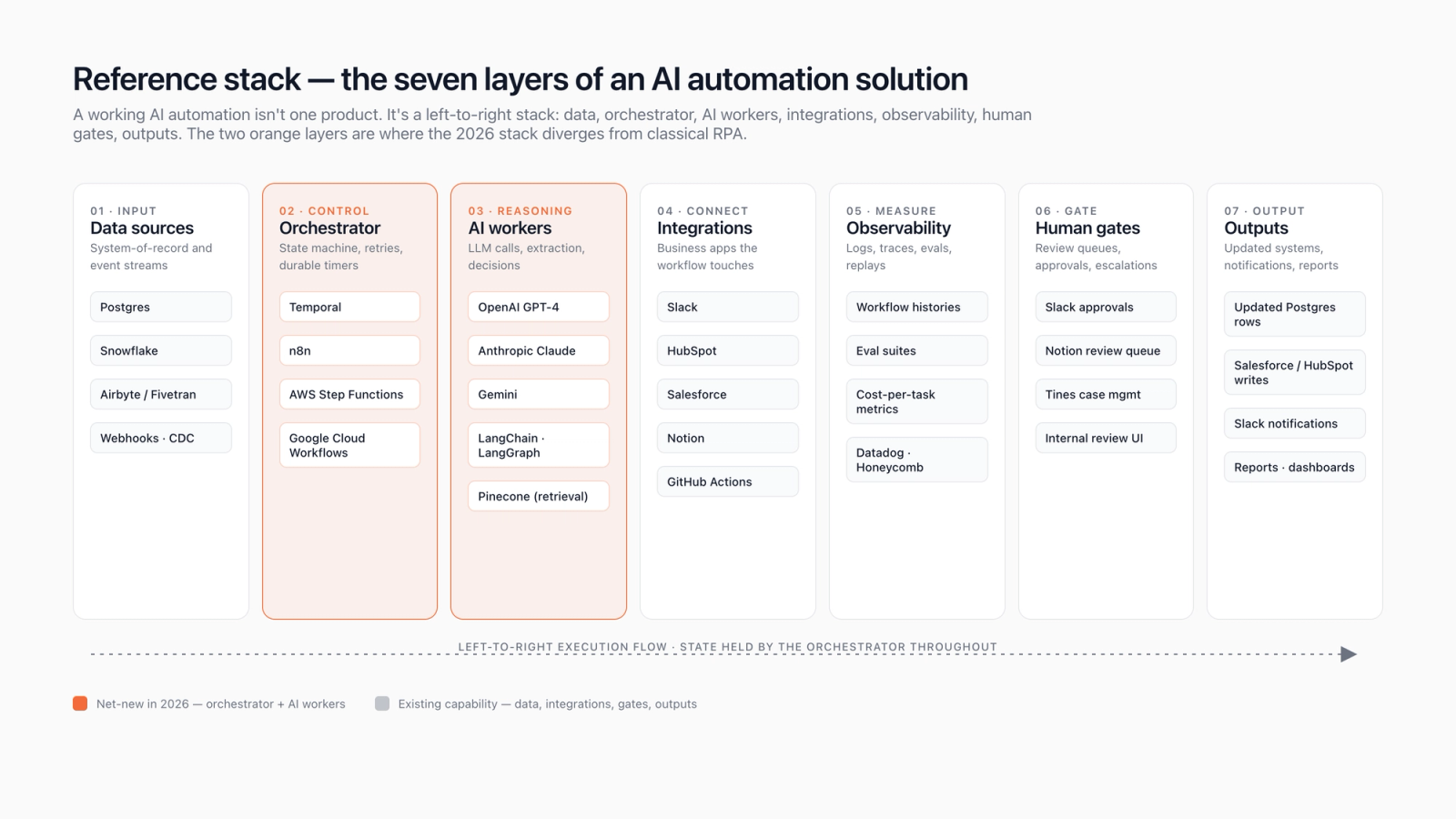
Step one. Pick one workflow with named volume; don't try to automate a department in a single pilot. "Triage invoices over $1000" beats "automate AP". Step two. Set a cost-per-task ceiling before you pick a vendor — if you can't tolerate above $0.10 per task, that rules out Workato Premium and Zapier at scale. Step three. Pick the architecture shape (visual, code, LLM-as-orchestrator); this is the hardest reversal later. Step four. Pick the orchestrator inside the shape — n8n or Make for visual, Temporal or Step Functions for code, LangGraph for LLM-as-orchestrator. Step five. Pick the model (start with Claude Haiku or Gemini Flash; upgrade only if quality fails an eval) and the retrieval layer (Pinecone or pgvector; start with pgvector if you already run Postgres). Step six. Ship observability before you ship the workflow — OpenTelemetry traces, per-execution logs to Postgres or BigQuery, alerts on failure rate and on cost-per-task drift. Step seven. Ship the human-in-the-loop reviewer queue with the workflow; nobody trusts a fresh automation enough to skip review for the first 6 weeks.
On the link in that CTA: our [workflow automation engineering practice](/services/ai-workflow-automation/) is the parent service for the whole picture this guide walks through — orchestrator selection, model integration, durability engineering, observability scaffolding, and the on-call rotation that keeps the pipeline running once it's live. It pairs with the seven-step checklist above; the checklist is what we run in the kickoff, the practice is the team that runs the pipeline afterward.
FAQ on AI automation solutions, in the buyer's vocabulary
What are ai automation solutions in plain language?
An ai automation solutions stack is durable workflow software (n8n, Make, Temporal, Tines) plus a model call (Claude, GPT-4, Gemini) that together replace a multi-step manual process — invoice triage, ticket routing, lead enrichment, alert handling. The orchestrator handles retries and state; the model handles the unstructured-data step that broke classical RPA. The 2026 default stack is two vendors composed, not a single platform.
How is this different from RPA?
Classical RPA (UiPath or Power Automate or Automation Anywhere) records user clicks on a brittle UI; an ai automation solutions flow uses an LLM to read the page or document semantically, which means a layout change doesn't break the bot. Cost-per-task tends to be 3 to 10x cheaper because the model replaces a screen-scrape step that needed careful maintenance. RPA still earns its fee for thick-client legacy systems with no API; the two patterns coexist in hybrid stacks.
Which ai automation solutions platform should I start with?
For an ops-led team without dedicated engineering, n8n self-hosted or Make Cloud. For an engineering-led team that needs durability under partial failure, Temporal or AWS Step Functions with Python workers. For security operations specifically, Tines is the strongest fit. We rarely recommend Workato or UiPath as the first pick for greenfield buyers in 2026 — they're stronger as the second platform inside an enterprise estate.
What's a realistic timeline for the first workflow live?
10 to 12 weeks from kickoff to a production-ready first workflow is the typical engagement shape — discovery (2 weeks), architecture and vendor selection (2 weeks), build and integration (4 to 6 weeks), observability and human-in-the-loop hardening (2 weeks). Anyone pitching a 4-week production pipeline is either skipping observability or skipping integration testing; both come back to bite inside the first quarter.
How much does an ai automation solutions build cost?
For a single mid-market workflow at the architecture shapes covered above, build cost lands in a small-to-large build range depending on connector complexity and whether the workflow touches regulated data. Ongoing cost is dominated by inference tokens (typically $50 to $500 per month at mid volumes) plus the platform fee for the orchestrator (free for n8n self-hosted, several hundred dollars a month for Make or Tines, four-figures for Workato or UiPath at scale).
Can ai automation solutions handle regulated data (PII, PHI, financial records)?
Yes, with the right stack. Use a self-hosted orchestrator (n8n self-hosted or Temporal on your own infrastructure), an enterprise model API with a signed DPA (Azure OpenAI, Anthropic on AWS Bedrock, or a self-hosted open-weight model like Llama 3.1 through vLLM), and encrypt PII before it enters the model context where the use case allows. Cloud-only platforms (Make or Workato Cloud or Zapier) usually fail the compliance bar for healthcare and parts of financial services.
Do I need LangChain, LangGraph, or neither?
Different jobs entirely. LangChain is a model-adapter library — useful for swapping GPT-4 for Claude without rewriting code, less useful if you're committed to a single model. LangGraph is an orchestration library for LLM-as-orchestrator workflows — useful when the model itself drives the flow. Neither is required for visual-orchestrator or code-first patterns; we ship plenty of Temporal workflows that talk to the OpenAI SDK directly without any wrapper. The framework debate matters less than the architecture choice.
Specifying an AI automation solutions build for 2026?
We help ops and engineering leads pick an architecture, score the vendor matrix, and ship the first production workflow in weeks instead of quarters.